How to Grow Your Instagram Followers Organically

How to Grow Your Instagram Followers Organically

Growing Instagram followers organically means increasing your audience without using paid ads or fake followers. It focuses on building a real, engaged community that trusts your brand and interacts with your content.

For small businesses and personal brands, organic growth is the best way to achieve long-term success and higher engagement.

📌 Why Organic Growth Matters

  • Builds genuine audience trust
  • Improves engagement (likes, comments, shares)
  • Helps in better reach through Instagram algorithm
  • Increases chances of converting followers into customers

🚀 Proven Strategies to Grow Instagram Followers Organically

1. Optimize Your Profile

Your profile is your first impression.

  • Use a clear profile picture (logo or personal image)
  • Write a simple and attractive bio
  • Add keywords related to your niche
  • Include a website or contact link

2. Post High-Quality Content

Content is the main factor for growth.

  • Use clear images and videos
  • Focus on value (tips, education, entertainment)
  • Maintain a consistent theme and style

👉 Quality content attracts more followers naturally.

3. Be Consistent

Consistency is key on Instagram.

  • Post at least 3–5 times per week
  • Stay active with stories and reels
  • Follow a content calendar

4. Use Instagram Reels

Reels have the highest reach on Instagram.

  • Create short, engaging videos
  • Follow trending audio and formats
  • Add hooks in the first 3 seconds

5. Use Relevant Hashtags

Hashtags help people discover your content.

  • Use 10–20 targeted hashtags
  • Mix popular and niche hashtags
  • Avoid spammy or irrelevant tags

6. Engage With Your Audience

Engagement increases visibility.

  • Reply to comments and DMs
  • Like and comment on others’ posts
  • Ask questions in captions

7. Collaborate With Others

Collaboration helps you reach new audiences.

  • Partner with influencers or similar pages
  • Do shoutouts or joint content
  • Use Instagram Collab feature

8. Post at the Right Time

Timing matters for better reach.

  • Post when your audience is active
  • Test different time slots
  • Use Instagram Insights for data

9. Use Stories & Highlights

Stories keep your audience engaged daily.

  • Share behind-the-scenes content
  • Use polls, quizzes, and stickers
  • Save important stories in highlights

10. Avoid Fake Growth Methods

  • Don’t buy followers
  • Avoid bots and spam comments

👉 These harm your account and reduce engagement.

đź’ˇ Pro Tips

  • Start your caption with a strong hook
  • Add a clear Call-To-Action (Follow, Comment, Share)
  • Focus on solving your audience’s problems
  • Analyze your performance regularly
Social Media Marketing Strategy for Small Businesses

Social Media Marketing Strategy for Small Businesses

In today’s digital world, social media has become a powerful tool for small businesses to grow their brand, connect with customers, and increase sales. A well-planned social media marketing strategy can help you stand out from competitors and build a strong online presence.

Whether you’re a local shop or a startup, the right approach can turn followers into loyal customers.

📌 What is Social Media Marketing?

Social media marketing (SMM) is the process of using platforms like Instagram, Facebook, LinkedIn, and YouTube to promote your business, engage with your audience, and achieve marketing goals such as brand awareness, lead generation, and sales.

🎯 Why Small Businesses Need Social Media Marketing

  • Cost-effective compared to traditional marketing
  • Direct interaction with customers
  • Builds trust and brand loyalty
  • Helps generate leads and increase sales
  • Improves online visibility

🚀 Step-by-Step Social Media Marketing Strategy

1. Define Your Goals

Start with clear goals like:

  • Increase followers
  • Generate leads
  • Boost website traffic
  • Improve engagement

Having a goal helps you measure success.

2. Know Your Target Audience

Understand who your customers are:

  • Age, location, interests
  • Problems and needs

This helps you create content that connects with them.

3. Choose the Right Platforms

Not every platform is necessary. Focus on where your audience is:

  • Instagram & Facebook – Best for local businesses
  • LinkedIn – For B2B services
  • YouTube – For video content

4. Create Valuable Content

Content is the key to success. Post a mix of:

  • Educational posts
  • Tips & tricks
  • Behind-the-scenes
  • Customer testimonials
  • Promotional content

👉 Follow the 80/20 rule: 80% value, 20% promotion.

5. Stay Consistent

Consistency builds trust.

  • Post regularly (3–5 times a week)
  • Use a content calendar
  • Maintain a consistent brand voice

6. Engage With Your Audience

Social media is not just about posting.

  • Reply to comments and messages
  • Ask questions
  • Run polls and contests

Engagement increases visibility and trust.

7. Use Hashtags & Trends

  • Use relevant hashtags to reach more people
  • Follow trending topics and formats (like reels)
  • Keep content updated with trends

8. Run Paid Ads (Optional but Powerful)

Social media ads can boost results quickly:

  • Target specific audiences
  • Promote offers and services
  • Generate quality leads

9. Track Performance

Analyze what works and what doesn’t:

  • Engagement rate
  • Reach and impressions
  • Clicks and conversions

Use tools like Instagram Insights or Facebook Analytics.

đź’ˇ Pro Tips for Better Results

  • Use high-quality images and videos
  • Keep captions simple and engaging
  • Add a strong Call-To-Action (CTA)
  • Focus on storytelling, not just selling
  • Experiment and improve continuously

🎯 Conclusion

A strong social media marketing strategy can help small businesses grow faster, build trust, and increase sales without spending huge budgets. The key is to stay consistent, understand your audience, and provide value.

If you want to grow your business through social media, Gunjan Next Level Digitals can help you create powerful strategies and deliver real results.

If you want next:
👉 I can create a 30-day social media content calendar
👉 OR write Instagram-specific growth strategy
👉 OR add SEO keywords + meta description for this blog 👍

Continue reading

Technical SEO Basics Every Website Owner Should Know

Technical SEO Basics Every Website Owner Should Know

Technical SEO is the foundation of your website’s performance on search engines. While content and keywords are important, technical SEO ensures that your website is properly structured, fast, and easy for search engines like Google to crawl and index.

Without strong technical SEO, even the best content may fail to rank.Continue reading

What is Keyword Research?

Keyword research is the foundation of successful SEO. If you choose the right keywords, your content can rank higher on Google, attract the right audience, and drive consistent traffic. But doing it “like a pro” means going beyond basic searches and understanding user intent, competition, and strategy.

What is Keyword Research?

Keyword research is the process of finding the words and phrases people type into search engines. These keywords help you create content that matches what your audience is searching for.

1. Start with a Clear Niche

Before you begin, define your niche. Are you focusing on digital marketing, fitness, or local business? A clear niche helps you find more relevant and targeted keywords.

2. Understand Search Intent

Professional keyword research is not just about volume—it’s about intent. There are four main types:

  • Informational (e.g., “what is SEO”)
  • Navigational (e.g., “Facebook login”)
  • Commercial (e.g., “best SEO tools”)
  • Transactional (e.g., “buy SEO services”)

Focus on keywords that match your goal.

3. Use Keyword Research Tools

Use tools to find keyword ideas and data:

  • Google Keyword Planner
  • Ubersuggest
  • Ahrefs
  • SEMrush

These tools show search volume, competition, and keyword difficulty.

4. Find Long-Tail Keywords

Long-tail keywords are longer and more specific phrases like:
“best SEO tips for beginners in India”

They usually have lower competition and higher conversion rates, making them perfect for beginners.

5. Analyze Your Competitors

Search your target keyword on Google and study the top-ranking pages:

  • What topics are they covering?
  • How long is their content?
  • Which keywords are they using?

This helps you understand what works and how to improve.

6. Check Keyword Difficulty

Not all keywords are easy to rank for. Choose keywords with low to medium competition if your website is new. High-competition keywords take more time and authority.

7. Focus on Search Volume + Relevance

A keyword with high volume is useless if it’s not relevant to your business. Choose keywords that match your audience and goals, even if the volume is lower.

8. Use Google Suggestions

Google itself is a powerful tool:

  • Autocomplete suggestions
  • “People Also Ask” section
  • Related searches at the bottom

These provide real user queries you can target.

9. Group and Organize Keywords

Don’t just collect keywords—organize them into groups. Create content clusters where one main keyword is supported by related subtopics.

10. Track and Improve

Keyword research is not a one-time task. Track your rankings and update your content regularly. Replace underperforming keywords and add new ones based on trends.

What is SEO?

Search Engine Optimization (SEO) is one of the most important skills in digital marketing today. If you want your website to appear on Google and attract free traffic, SEO is the key. This beginner-friendly guide will help you understand what SEO is, how it works, and why it matters in 2026.

What is SEO?

SEO (Search Engine Optimization) is the process of improving your website so that it ranks higher on search engines like Google, Bing, and Yahoo. The higher your website appears in search results, the more people will visit it—without paying for ads.

For example, if someone searches “best digital marketing agency,” SEO helps your website show up on the first page.

Why is SEO Important in 2026?

In 2026, competition online is higher than ever. Millions of websites are fighting for attention. SEO helps you:

  • Get free (organic) traffic
  • Build trust and credibility
  • Improve brand visibility
  • Generate leads and sales

Unlike paid ads, SEO gives long-term results. Once your website ranks well, it can continue bringing traffic for months or even years.

How Search Engines Work

Search engines follow three main steps:

1. Crawling

Search engines use bots (called crawlers or spiders) to scan websites and discover new content.

2. Indexing

After crawling, the content is stored in a database (index). Only indexed pages can appear in search results.

3. Ranking

When a user searches something, the search engine shows the most relevant and useful pages based on many factors.

Types of SEO

1. On-Page SEO

This focuses on optimizing content on your website:

  • Using the right keywords
  • Writing high-quality content
  • Optimizing titles, headings, and meta descriptions
  • Adding internal links

2. Off-Page SEO

This involves actions outside your website:

  • Building backlinks (links from other websites)
  • Social media sharing
  • Brand mentions

3. Technical SEO

This ensures your website works properly:

  • Fast loading speed
  • Mobile-friendly design
  • Secure website (HTTPS)
  • Proper site structure

Keywords: The Foundation of SEO

 Finding the right keywords helps you create content that matches user intent.

For example:

  • “What is SEO” (informational)
  • “Best SEO tools” (commercial)

Use tools like Google Keyword Planner or Ubersuggest to find keywords with good search volume and low competition.

Content is King

In 2026, high-quality content is more important than ever. Google prefers content that is:

  • Helpful and informative
  • Easy to read
  • Original and unique
  • Updated regularly

Focus on solving user problems instead of just adding keywords.

Important SEO Ranking Factors

Some key factors that affect rankings include:

  • Quality content
  • Backlinks
  • Page speed
  • Mobile-friendliness
  • User experience (UX)

Google also considers user behavior, like how long visitors stay on your site.

Common SEO Mistakes to Avoid

  • Keyword stuffing (overusing keywords)
  • Copying content from other websites
  • Ignoring mobile optimization
  • Not updating old content
  • Buying low-quality backlinks

How to Write Emails That Convert into Sales

Writing emails that actually convert into sales is both an art and a strategy. It’s not just about promoting a product—it’s about understanding your audience, building trust, and guiding them toward action. A well-written email can turn a simple subscriber into a paying customer.

1. Start with a Strong Subject Line

Your email won’t convert if it’s not opened. Write subject lines that create curiosity or highlight a clear benefit. Keep them short, relevant, and focused on the reader’s needs.

2. Focus on the Reader, Not Just the Product

Many beginners make the mistake of talking only about their product. Instead, focus on the customer’s problem. Show them you understand their pain points and position your product or service as the solution.

3. Use a Clear and Engaging Opening

The first few lines of your email are crucial. Start with a question, a relatable situation, or a bold statement that hooks the reader instantly. If the opening is boring, people will stop reading.

4. Highlight Benefits, Not Features

Don’t just list features—explain how your product will improve the reader’s life. For example, instead of saying “Our software has automation tools,” say “Save hours of manual work with our easy automation system.”

5. Keep It Simple and Easy to Read

Avoid long paragraphs and complicated language. Use short sentences and a conversational tone. Your email should feel like a one-on-one conversation, not a formal sales pitch.

6. Build Trust with Social Proof

People trust other people. Add testimonials, reviews, or case studies to show that your product works. Even a short success story can increase credibility and conversions.

7. Create Urgency and Scarcity

Encourage readers to take action now. Use phrases like “Limited Time Offer” or “Only a Few Spots Left.” But be honest—fake urgency can damage trust.

8. Add a Clear Call-to-Action (CTA)

Every email should have one clear goal. Tell your readers exactly what to do next—whether it’s “Buy Now,” “Get Started,” or “Claim Your Offer.” Make your CTA simple and visible.

9. Optimize for Mobile

Most people read emails on their phones. Make sure your emails are mobile-friendly, with short paragraphs and easy-to-click links or buttons.

10. Test and Improve

Not every email will be perfect. Test different subject lines, content styles, and CTAs. Analyze what works best and keep improving your strategy over time.

Best Free Email Marketing Tools for Beginners

Starting with email marketing can feel confusing, especially when there are so many tools available. The good news is that many platforms offer free plans that are perfect for beginners. These tools allow you to build your email list, send campaigns, and even automate emails without spending money.

Here are some of the best free email marketing tools for beginners and what makes them useful:

1. Brevo (Formerly Sendinblue)

Brevo is often considered one of the best free tools for beginners because it offers unlimited contacts and allows you to send up to a fixed number of emails per day. It includes features like templates, basic automation, and analytics.
It’s ideal if you want a simple start and plan to grow gradually.

2. MailerLite

MailerLite is known for its easy-to-use interface and powerful drag-and-drop editor. Even on the free plan, you get landing pages, signup forms, and basic automation.
This makes it a great choice for bloggers, freelancers, and small businesses who want professional-looking emails.

3. Mailchimp

Mailchimp is one of the most popular email marketing platforms worldwide. It offers a beginner-friendly interface, templates, and integrations with many tools.
However, its free plan is limited in terms of subscribers and features, so you may outgrow it quickly.

4. ConvertKit (Kit)

ConvertKit is designed mainly for creators like bloggers, YouTubers, and coaches. Its free plan allows up to 10,000 subscribers, which is one of the highest limits available.
It focuses more on simple, text-based emails rather than heavy design.

5. Sender

Sender offers one of the most balanced free plans. You get automation, email templates, and even SMS features along with a decent number of subscribers and monthly emails.
It’s a great all-in-one option for beginners who want more features without paying.

6. EmailOctopus

EmailOctopus is a simple and budget-friendly tool. It provides landing pages, forms, and basic automation features.
This tool is best for users who want a clean and minimal platform without too many advanced features.

Why Use Free Email Marketing Tools?

Free tools are perfect for beginners because they help you:

  • Learn email marketing without risk
  • Build your email list from scratch
  • Test campaigns and strategies
  • Understand what works before investing money

Most free plans include basic features like email templates, signup forms, and analytics—enough to get started.

Final Thoughts

Choosing the right tool depends on your needs. If you want simplicity, go for MailerLite. If you need more subscribers, ConvertKit is a strong option. For an all-round free plan, Sender or Brevo works best.

Remember, no tool is perfect. Free plans always come with limits like fewer subscribers or restricted features. But they are more than enough to start your journey.

As your email list grows, you can upgrade to paid plans for advanced features. Until then, focus on building your audience and providing value—that’s what truly makes email marketing successful.

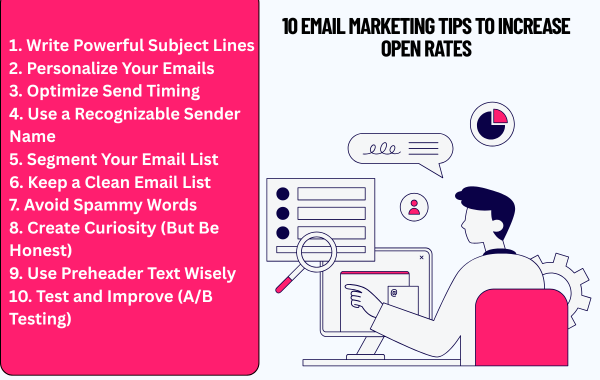
10 Email Marketing Tips to Increase Open Rates

Getting people to open your emails is one of the biggest challenges in email marketing. You might have a great offer or valuable content, but if your email isn’t opened, it won’t deliver results. Improving your open rates is all about understanding your audience and optimizing how you present your emails.

1. Write Powerful Subject Lines

 Keep it short, clear, and curiosity-driven. Use action words or questions to grab attention, but avoid clickbait.

2. Personalize Your Emails

Emails with the recipient’s name or personalized content perform better. Use data like location, past behavior, or interests to make your emails feel more relevant.

3. Optimize Send Timing

Timing plays a big role in open rates. Test different days and times to see when your audience is most active. For many audiences, mornings and early evenings work well.

4. Use a Recognizable Sender Name

People open emails from senders they trust. Use a consistent and familiar name, such as your brand or a real person from your company.

5. Segment Your Email List

Not all subscribers are the same. Divide your list based on interests, behavior, or demographics. Sending targeted emails increases relevance and boosts open rates.

6. Keep a Clean Email List

Remove inactive subscribers regularly. Sending emails to people who never open them can hurt your overall performance and deliverability.

7. Avoid Spammy Words

Words like “Free,” “100% Guarantee,” or “Earn Money Fast” can trigger spam filters. Keep your language natural and trustworthy.

8. Create Curiosity (But Be Honest)

Make readers curious enough to open your email, but don’t mislead them. If your content matches the subject line, people will continue to trust your emails.

9. Use Preheader Text Wisely

The preheader (preview text) supports your subject line. Use it to give more context or create additional interest. Think of it as a second chance to convince users to open.

10. Test and Improve (A/B Testing)

Always test different subject lines, formats, and timings.

Final Thoughts

Increasing email open rates is not about one trick—it’s about consistent improvement. Focus on delivering value, building trust, and understanding your audience. When your emails feel relevant and useful, people will naturally want to open them.

By applying these tips, you can improve engagement, strengthen relationships with your audience, and get better results from your email marketing efforts

How to Build an Email List from Zero


What is Email Marketing? Benefits & Strategy

What is Email Marketing? Benefits & Strategy

Email marketing is one of the most powerful and cost-effective digital marketing techniques used by businesses to connect directly with their audience. It involves sending emails to potential and existing customers to promote products, share updates, build relationships, and drive sales.

Unlike social media platforms where algorithms control reach, email marketing gives you direct access to your audience’s inbox, making it a reliable and high-converting marketing channel.

📌 What is Email Marketing?

Email marketing is the process of sending targeted emails to a group of people who have shown interest in your business. These emails can include promotional offers, newsletters, product updates, or valuable content.

For example, when a customer subscribes to your website or signs up for a free resource, you can send them regular emails to stay connected and build trust.

âś… Benefits of Email Marketing

1. Cost-Effective Marketing

Email marketing is affordable compared to paid ads. You can reach thousands of people at a very low cost.

2. Direct Communication

It allows you to communicate directly with your audience without any middle platform or algorithm.

3. High ROI (Return on Investment)

Email marketing often delivers one of the highest ROI among all digital marketing channels.

4. Builds Customer Relationships

Regular emails help in building trust and long-term relationships with your customers.

5. Personalization

You can send personalized messages based on user behavior, interests, and preferences.

6. Increases Sales & Conversions

Well-planned email campaigns can drive traffic and increase sales significantly.

🚀 Types of Email Marketing

  • Promotional Emails – Offers, discounts, product launches
  • Newsletter Emails – Regular updates and valuable content
  • Welcome Emails – Sent to new subscribers
  • Transactional Emails – Order confirmations, receipts
  • Follow-up Emails – Reminders or re-engagement

📊 Email Marketing Strategy (Step-by-Step)

1. Build an Email List

Start by collecting emails through your website, landing pages, or lead magnets like free guides, courses, or discounts.

2. Choose the Right Tool

Use platforms like Mailchimp, ConvertKit, or Sendinblue to manage and automate your emails.

3. Segment Your Audience

Divide your audience into groups based on interests, location, or behavior to send more relevant emails.

4. Create Valuable Content

Focus on providing useful and engaging content instead of just selling.

5. Write Attractive Subject Lines

Your subject line should be catchy and create curiosity to improve open rates.

6. Optimize for Mobile

Most users check emails on mobile, so make sure your emails are mobile-friendly.

7. Track & Improve

Analyze open rates, click rates, and conversions to improve your campaigns.